
1️⃣.安装运行环境
🥇 先确认 Python3 是否存在
python3 -V
如果有输出版本号(比如 Python 3.8.10),说明 Python3 已安装

如果没有 → 需要先安装 Python3
🛠️ 安装 pip3(推荐方法)
👉 Ubuntu / Debian 系(最常见)
apt update
apt install -y python3-pip
2️⃣.创建签到文件
新建文件 akile_checkin.py 推荐在root目录下创建
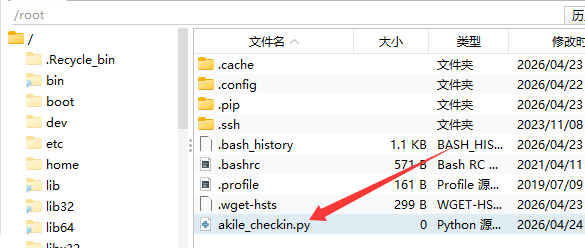
填写内容,根据自己的需求进行修改
#!/usr/bin/env python3
"""AkileCloud 每日自动签到脚本,签到后推送到 Telegram"""

import requests
from datetime import datetime

# ==================== 配置区 ====================
EMAIL = ""              #账号
PASSWORD = ""           #密码
TG_BOT_TOKEN = ""       #机器人token
TG_CHAT_ID = ""         #个人账号的id
# ================================================


def now():
    return datetime.now().strftime("%Y-%m-%d %H:%M:%S")


def send_tg(msg):
    requests.post(
        f"https://api.telegram.org/bot{TG_BOT_TOKEN}/sendMessage",
        json={"chat_id": TG_CHAT_ID, "text": msg},
        timeout=10
    )


def get_ak_coin(session):
    """查询当前 AK 币余额(来自 /api/v1/user/index),失败返回 None"""
    r = session.get("https://api.akile.ai/api/v1/user/index")
    data = r.json()
    if data.get("status_code") == 0:
        return data.get("data", {}).get("ak_coin")
    return None


def checkin():
    session = requests.Session()
    session.headers.update({
        "Content-Type": "application/json",
        "Origin": "https://akile.ai",
        "Referer": "https://akile.ai/",
        "User-Agent": "Mozilla/5.0 (Windows NT 10.0; Win64; x64) AppleWebKit/537.36"
    })

    r = session.post("https://api.akile.ai/api/v1/user/login", json={
        "email": EMAIL, "password": PASSWORD, "token": "", "verifyCode": ""
    })
    if r.status_code != 200:
        msg = f"❌ AkileCloud 签到失败\n登录错误: {r.status_code}"
        send_tg(msg); return

    token = r.json().get("data", {}).get("token")
    if not token:
        msg = "❌ AkileCloud 签到失败\n获取 token 失败"
        send_tg(msg); return

    session.headers["Authorization"] = token

    coin_before = get_ak_coin(session)

    r2 = session.get("https://api.akile.ai/api/v1/user/Checkin")
    result = r2.json()
    status_msg = result.get("status_msg", str(result))
    status_code = result.get("status_code")

    coin_after = get_ak_coin(session)

    if coin_after is not None:
        coin_line = f"💰 当前 AK 币: {coin_after}"
        if coin_before is not None and coin_after > coin_before:
            earned = coin_after - coin_before
            coin_line = f"🎁 获得: +{earned} AK 币\n💰 当前余额: {coin_after} AK 币"
    else:
        coin_line = ""

    if status_code in (0, 1):
        msg = f"✅ AkileCloud 每日签到\n{now()}\n结果: {status_msg}"
    else:
        msg = f"⚠️ AkileCloud 签到\n{now()}\n结果: {status_msg}"

    if coin_line:
        msg += f"\n{coin_line}"

    print(f"[{now()}] {status_msg}")
    send_tg(msg)


if __name__ == "__main__":
    checkin()
如果你不绑定推送每次签到的日志会保存到/var/log/auto-clean.log这个文件里面
3️⃣.测速运行
在服务器内输入指令
python3 akile_checkin.py

同时你的tg也会收到推送
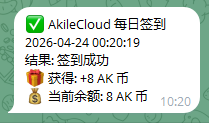
4️⃣.设置定时任务
设置每天自动运行(定时任务)
crontab -e在最后一行加上(每天早上 8 点运行):
0 8 * * * python3 ~/akile_checkin.py >> ~/akile_checkin.log 2>&1如果你不会使用这个方法,可以看一下下面
打开下方路径的文件
/var/spool/cron/crontabs/用户名

将上面的代码填入最下面,然后点击保存
好啦,到这里教程也就结束拉